

Syntax
=DRAGON_AMAZON_FEES(account, [ASIN/SKU], [marketplace], [fulfillment], [period], [period view], [basis], [view], [fee], [columns], [header], [transpose])
Parameters in [brackets] are optional. Leave an optional parameter blank to include everything.
This page is also available inside Sheets – type
=DRAGON_AMAZON_FEES("help") in any cell to get the same reference without leaving your spreadsheet.Sample output
Example output from the Nordvik demo store – your sheet shows your own store's data.
A1fx
=DRAGON_AMAZON_FEES("Nordvik", "", "US", "FBA", "last_5_days")| A | B | C | D | E | F | G | |
|---|---|---|---|---|---|---|---|
| 1 | sku | asin | 2026-10-12 | 2026-10-11 | 2026-10-10 | 2026-10-09 | 2026-10-08 |
| 2 | NV-HAT-CHARCOAL | B0KNIT0101 | 34.66 | 43.32 | 34.66 | 43.32 | 8.66 |
| 3 | NV-HAT-NAVY | B0KNIT0104 | 25.99 | 25.99 | 34.66 | 25.99 | 17.33 |
| 4 | NV-TEE-BLACK-L | B0KNIT0109 | 30.94 | 0.00 | 23.20 | 7.73 | 7.73 |
| 5 | NV-SWT-CHARCOAL-L | B0KNIT0121 | 0.00 | 15.48 | 46.45 | 30.97 | 30.97 |
Video walkthrough
Parameters
| Parameter | Required | Description |
|---|---|---|
| account | Required | Account nickname, account number (1, 2, ...) or Amazon account id. Leave empty if you have only one account. |
| ASIN/SKU | Optional | Optional ASIN, SKU, or a list separated by ;. Also accepts a cell range like A2:A100 or INDIRECT() pointing to a list. |
| marketplace | Optional | One marketplace/country code such as US, CA, or MX. Blank = this sheet's default marketplace (Extensions > SellerDragon > Default Marketplace); without a default, enter one. |
| fulfillment | Optional | Optional fulfillment filter: FBA or FBM. |
| period | Optional | Optional period such as last 90 days, 2026-04, or 2026. Default: last 90 days. |
| period view | Optional | Optional period view: DAY, WEEK, MONTH, QUARTER, YEAR, or TOTAL. Default: DAY. |
| basis | Optional | Optional row basis: ASIN or SKU. Default: ASIN. |
| view | Optional | Optional output view: DETAILS, SUMMARY, or TOTAL (one column with the total for the period, rows in your ASIN/SKU order). Default: DETAILS. |
| fee | Optional | Optional fee part: TOTAL, REFERRAL, FBA, or OTHER. Several are added together, e.g. referral;fba. Default: TOTAL. |
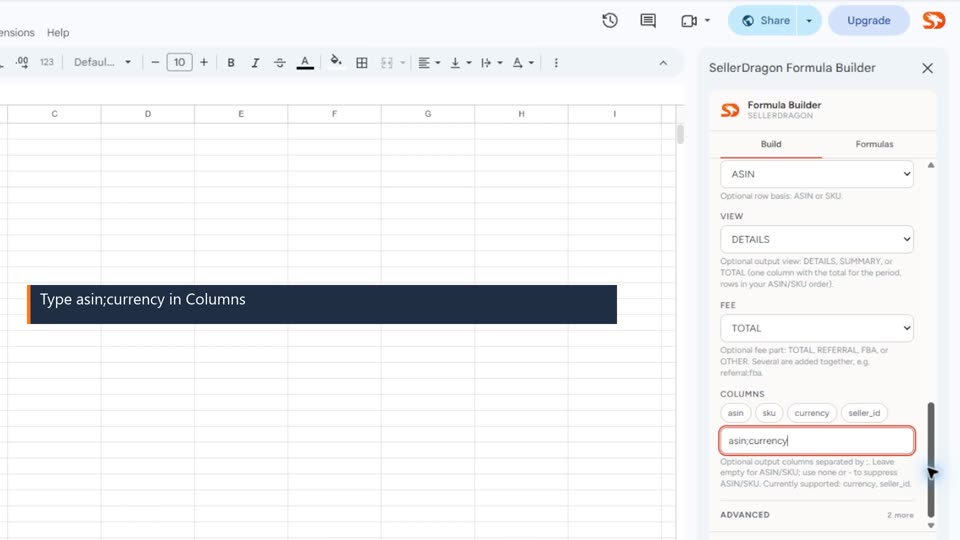
| columns | Optional | Optional output columns separated by ;. Leave empty for ASIN/SKU; use none or - to suppress ASIN/SKU. Currently supported: currency, seller_id. |
| header | Optional | Use no, false, or 0 to suppress the output header row. Default: Yes. |
| transpose | Optional | Use yes, true, or 1 to transpose the output. |
The period accepts values like last_30_days, this_month, 2026Q1, or ranges like 2026-01-01..today – see the full period reference.
Columns
Columns are evaluated left to right: a field or group name adds columns, a leading - removes them. default and all select the default or full column set.
| Column | Default | Description |
|---|---|---|
| asin | Yes | Asin. |
| sku | Yes | Seller sku. |
| currency | Yes | Currency. |
| seller_id | No | Amazon seller id (merchant token) of the store. |
Examples
=DRAGON_AMAZON_FEES("Mystore", A2:A50, "US", "", "last 30 days", "", "", "total")
=DRAGON_AMAZON_FEES("Mystore", "", "US", "FBA", "last 12 months", "month", "asin", "details", "referral;fba")
Notes
- Fees are shown as positive costs, dated by the order day, so they line up with dragon_sales_totals and dragon_sales_count for the same period and products.
- Amazon posts fees 1-3 days after an order. Until then, recent orders carry an estimate from that SKU's average fee per unit, the same way the dashboard does.
- fee: TOTAL (default) is every order fee. REFERRAL is the referral and closing fees, FBA the FBA fulfilment fee, OTHER the rest plus estimates not yet posted. Several are added together, e.g. referral;fba.
- Only fees tied to an order are included. Storage, inbound, subscription and coupon fees are not; use dragon_finance for those.
- view: DETAILS returns ASIN/SKU rows. SUMMARY returns one row for the whole account. TOTAL returns one column with the fees for the whole period, rows in your ASIN/SKU order (add asin or sku in columns to show the id).
- columns: leave empty for ASIN/SKU; use compact, none, or - to suppress ASIN/SKU. Use currency to show the currency.
Not running SellerDragon yet? One connected account – your data in Google Sheets™, a dashboard that acts, and your AI on the account. Plans from 99 USD.
See how it works