

Syntax
=DRAGON_LANDED_COST(account, [ASIN/SKU], [marketplace], [fulfillment], [columns], [header], [transpose])
Parameters in [brackets] are optional. Leave an optional parameter blank to include everything.
This page is also available inside Sheets – type
=DRAGON_LANDED_COST("help") in any cell to get the same reference without leaving your spreadsheet.Sample output
Example output from the Nordvik demo store – your sheet shows your own store's data.
A1fx
=DRAGON_LANDED_COST("Nordvik", "", "US")| A | B | C | |
|---|---|---|---|
| 1 | sku | asin | landed_cost |
| 2 | NV-HAT-CHARCOAL | B0KNIT0101 | 8.38 |
| 3 | NV-HAT-NAVY | B0KNIT0104 | 8.38 |
| 4 | NV-TEE-BLACK-L | B0KNIT0109 | 7.48 |
| 5 | NV-SWT-CHARCOAL-L | B0KNIT0121 | 14.98 |
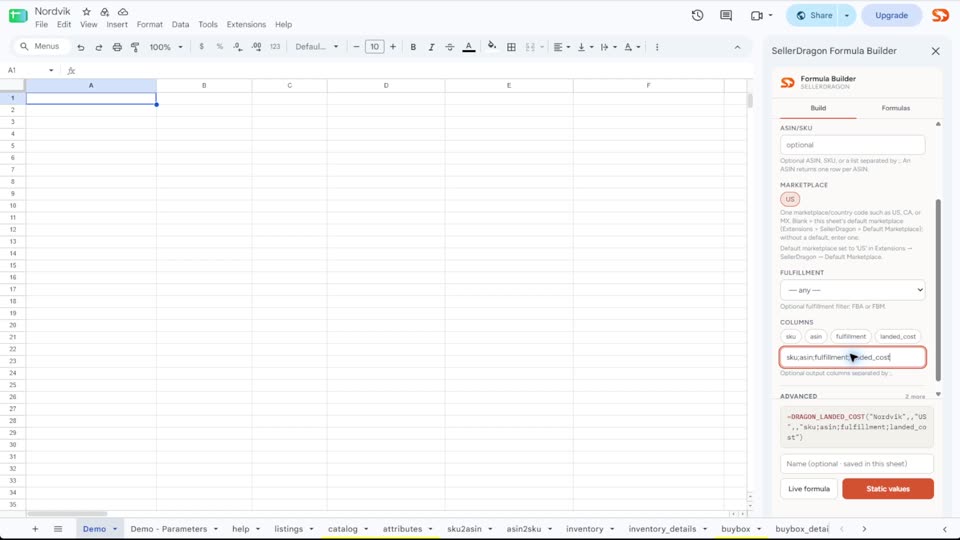
Video walkthrough
Parameters
| Parameter | Required | Description |
|---|---|---|
| account | Required | Account nickname, account number (1, 2, ...) or Amazon account id. Leave empty if you have only one account. |
| ASIN/SKU | Optional | Optional ASIN, SKU, or a list separated by ;. An ASIN returns one row per ASIN. Also accepts a cell range like A2:A100 or INDIRECT() pointing to a list. |
| marketplace | Optional | One marketplace/country code such as US, CA, or MX. Blank = this sheet's default marketplace (Extensions > SellerDragon > Default Marketplace); without a default, enter one. |
| fulfillment | Optional | Optional fulfillment filter: FBA or FBM. |
| columns | Optional | Optional output columns separated by ;. |
| header | Optional | Use no, false, or 0 to suppress the output header row. Default: Yes. |
| transpose | Optional | Use yes, true, or 1 to transpose the output. |
Columns
Columns are evaluated left to right: a field or group name adds columns, a leading - removes them. default and all select the default or full column set.
| Column | Default | Description |
|---|---|---|
| sku | Yes | SKU. |
| asin | Yes | ASIN. |
| fulfillment | No | Fulfillment channel: FBA or FBM. |
| landed_cost | Yes | Landed cost per unit in the marketplace currency, as set in the dashboard. Blank = not set. |
Examples
=DRAGON_LANDED_COST("Mystore", "B0MYASIN01", "US")
=DRAGON_LANDED_COST("Mystore", A2:A50, "US", "FBA")
Notes
- Landed costs are set in the dashboard under Settings > SKU Settings (/settings/sku-settings). The sheet only reads them.
- A SKU without a landed cost in the dashboard shows blank. The cost is in the marketplace currency.
- fulfillment: FBA or FBM limits the SKUs; leave it empty for both.
- Send an ASIN and its SKUs merge into one row; the same cost shows once, different costs are listed together. Set fulfillment to get exactly one cost per ASIN.
Not running SellerDragon yet? One connected account – your data in Google Sheets™, a dashboard that acts, and your AI on the account. Plans from 99 USD.
See how it works