

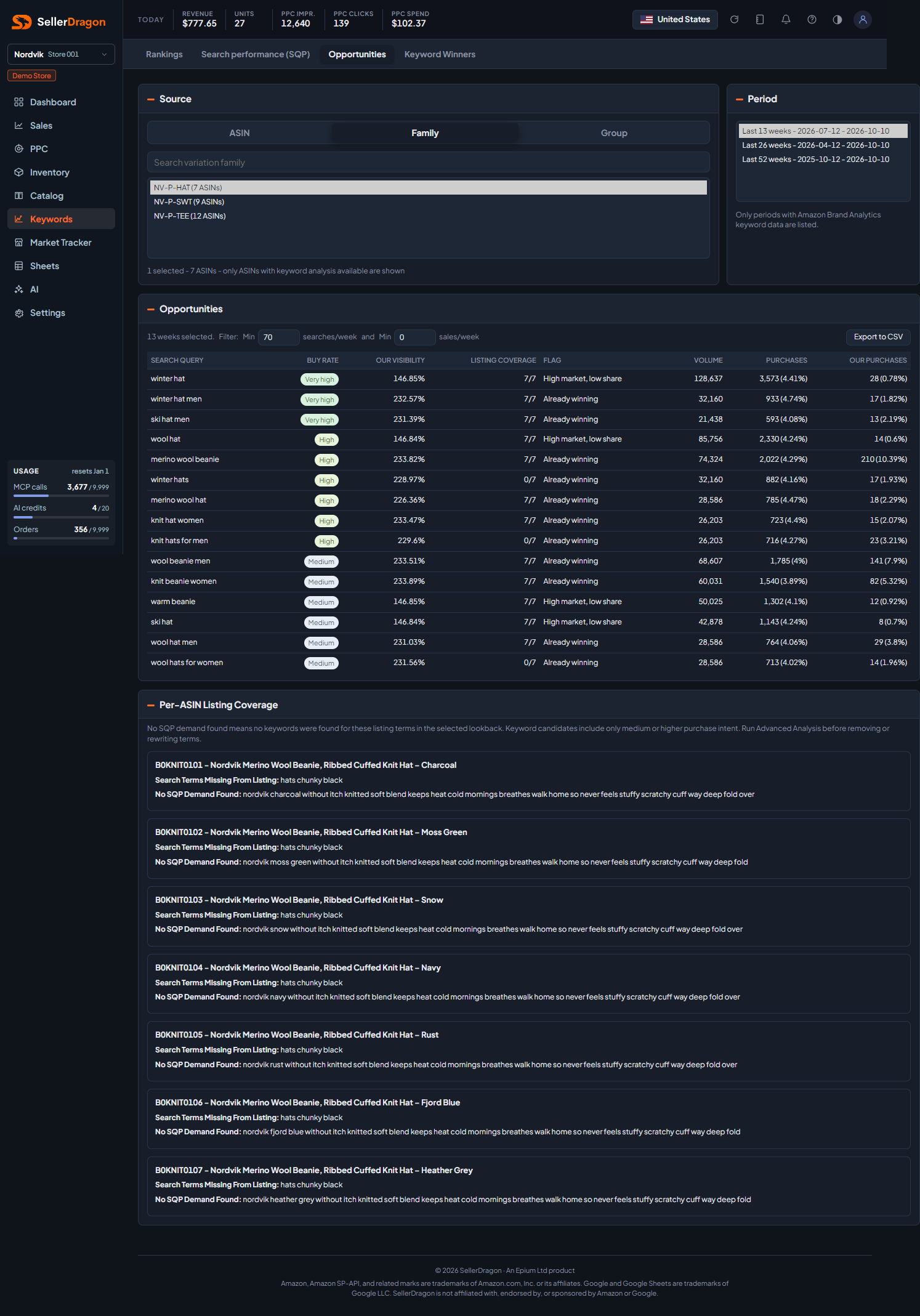
What this page answers
Which searches are worth working on for this product: the ones where the market buys a lot and you do not yet take your share, and which words your listings are missing for them.
Whose data and scope
- One store and one marketplace. Source is one or more ASINs, variation families or product groups that have search data.
- Data is Amazon's Search Query Performance (Brand Registry needed), over the last 13, 26 or 52 reporting weeks. Only periods with data are offered.
- "Our" figures for a family or group sum its ASINs, so visibility can exceed 100 percent when several of your products appear on one search.
- Listing coverage compares the words of each search with the words in each ASIN's title, bullets, description and search terms.
How to read it
Source and period
Pick the grain and the entries, then the period. The filter line under the table title lets you hide searches below a minimum of searches per week or sales per week. Export to CSV writes the whole filtered table with raw numbers.
Opportunities table
- Buy Rate is purchases divided by searches for the whole market, shown as a level from Very low to Very high relative to the other searches in the table. High buy rate means shoppers on that search are ready to buy.
- Our Visibility is our impressions as a share of the search volume.
- Listing Coverage is how many of the source's ASINs contain every word of the search in their listing text.
- Flag is a fixed rule applied to the row: High intent, low visibility (buy rate high, visibility under 5 percent); High market, low share (100 or more purchases, our share under 1 percent); Visible, not clicked (visibility 20 percent or more, click share under a quarter of a percent); Clicked, not purchased (click share 1 percent or more, purchase share under half a percent); Already winning (visible and taking 1 percent or more of purchases); Low intent; otherwise Monitor.
- Volume, Purchases with the market's purchase rate, and Our Purchases with our purchase share.
Per-ASIN listing coverage
For every ASIN in the source: Search Terms Missing From Listing lists words from medium-or-higher intent searches that the listing does not contain, best first. No SQP Demand Found lists words in the listing that appear in no search at all. Treat the second list as a prompt to check, not a cue to delete; brand names and feature words often sit there legitimately.
Where to go next
- Listing text editor to add the missing words.
- Optimize Listing to rewrite the copy around them.
- Search performance (SQP) for the full numbers behind a search.
- Keyword rankings to track where you land for it.